As a teacher, I think it would be important to maintain and update my class’ web page. It’s crucial to be transparent, for both yourself and the child’s parents’ sake. By keeping the class page relevant, it helps the teacher stay organized and connected to the parents while allowing the parents to get a feel for what the school has to offer and how it operates. Depending on how the class page is set up, it can be very helpful and worth the effort of sustaining. In my opinion, a good class page will have essential information like: teacher’s name and contact information, what’s being taught in class, school calendar, photos of projects and events, and resource suggestions parents can use with their kids.
If I were a teacher, I would find desktop publishing software and creativity software to be the most interesting. With the desktop publishing software, you can maintain the calendar for the classroom and e-mail fellow teachers or parents, if need be. It also includes the teacher’s software programs and personal files, which they could access from home. This type of software seems to be very vital for a teacher who wishes to stay in line. Another interesting tool is the creative software tool. This tool allows the teacher to do photo editing, illustrations, and other imaginative tasks. I can see teachers using this tool to come up with fun ideas or projects for their students versus having to use out dated means of teaching which doesn’t always educate the students best.
Software Resources: https://designer.io/ or https://www.gimp.org/
I envision using technology, such as a computer and phone, to help stay connected with my coworkers and the public. It will be imperative to keep lines of communication open between the two in order to work effectively. The computer will also come in handy during the times when I need to research and acquire information needed for an assignment, or If I need to complete a project. I might also need technology to help me stay in tune with new developments within my career. I might accomplish this through webinars or through conferences that help me do my job more efficiently.
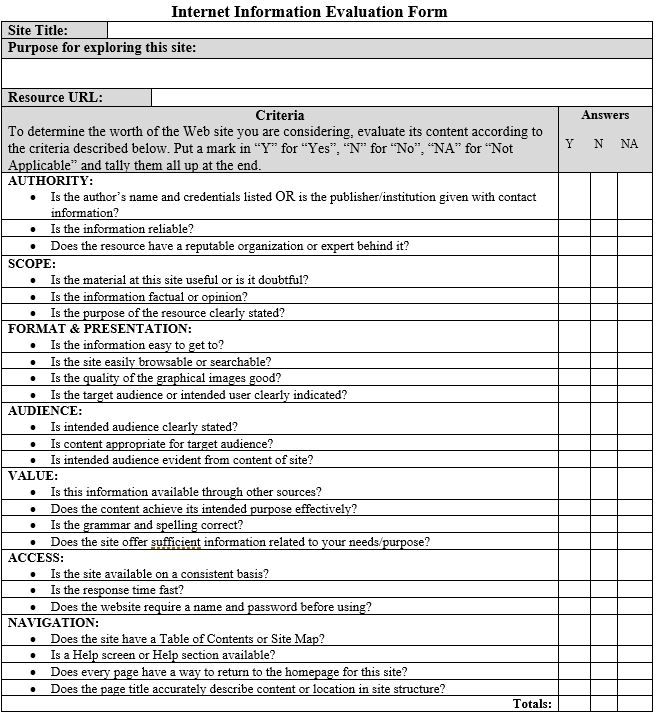
In completing the web evaluation assignment, I learned a couple of things. I learned what to look for in a website and how to determine if the website is credible. I also learned some new skills in MS Word, which was nice as Word is such a commonly used tool. Even though I did learn new tools within MS Word and how to structure an evaluation form, it was difficult to keep the alignment of the form. I kept running into situation where I had to restructure a cell or line aside from the rest of the them in order to keep the whole thing graphically pleasing. The one thing that I didn’t enjoy from this assignment was having to create a web evaluation form from scratch with no prior knowledge of how to do so. It took a great deal of time to come up with how I wanted the form to look and what sort of information and criteria I wanted to be within the form. The information I learned from this activity can be used on resource gathering and information collecting that can help supply my boss or coworkers with the information they need. Knowing how to spot credible, and more importantly non-credible sites, is extremely important when it comes to making decisions and forming properly educated opinions.

 Ally Mathew's EME2040 Blog